- 閱讀權限
- 101
- 最後登錄
- 17-1-10
- 精華
- 1
- UID
- 909365
- 帖子
- 2972
- 積分
- 7659
- 註冊時間
- 07-6-28
- 在線時間
- 790 小時

- UID
- 909365
- 帖子
- 2972
- 積分
- 7659
- Good
- 244
- 註冊時間
- 07-6-28
- 在線時間
- 790 小時

|
更新 net framework 3.5或以上及安装 visual c++2005
GTA4我已经期待好久了,终于在emule上出现了RAZOR 1911集成破解版。在13个G的漫长下载过程中,我从网上了解到,Razor 1911是最好的破解版本,因为它成功的破解了SecuROM。我本来以为我下载的版本直接安装后就可以使用,其实还是要用 Razor 1911免DVD补丁覆盖源文件才可以执行。
当我把一切都准备好了的时候,双击“LaunchGTAIV.exe”的图标,首先显示的是Razor 1911的LOGO,随后紧接着便弹出了一个错误(Error)提示框,提示:SecuLauncher: failed to start application. [2000] 。单击确定后程序便自动退出,无法进入到游戏。
后来我又从游侠网上下载了一个最初的、只有27KB的破解补丁,覆盖后运行时同样出现错误,提示:Could not run GTAIV.exe .
这可怎么办?我尝试了一切可以尝试的办法:重启电脑、关闭防病毒软件、卸载无用程序、重装电脑……但是问题一直无法解决。
后来我从网上了解到,破解补丁不能运行的原因是系统没有安装Microsoft Visual C++ 2005,导致程序不能运行。回想安装过程,的确有一个程序运行时提示安装错误。打开安装时的文件夹一看,确实在Redistributable文件夹下有一名为 vcredist_x86.exe的程序运行时提示错误:Command line option syntax error. Type Command /? for Help. 看来就是这个程序的问题了。
我本以为是这个程序坏了,在我的机器上不能运行,可谁知,从微软官方网站上下载的同样的程序也有同样的提示,不能运行(即使我把程序拷贝到C盘根目录下执行)。
从网上提说安装Microsoft Visual C++ 2005也能解决问题。但我到网上一搜,好家伙,最小的 Microsoft Visual C++ 2005也要有2个多G,如果加上MSDN,居然有3.5G。就凭我的慢网速,我再也没有心情下载了,更何况 Visual C++ 2005我一点也不会用,安装2个多G的编程软件纯粹为了一个玩游戏!
但是咱也是用过其他语言编程的,知道程序不能运行决不是缺少整套编程语言,而是缺少某些运行时需要用到的控件、库文件等等。照着这个思路,我终于找到了解决办法。缺少的文件我已经打包上传,
下载地址是:
http://download.csdn.net/source/994507
下载上述文件后解压,会有一个EXE文件,双击运行,再单击程序中间的“运行!”按钮即可。安装过程会有进度条提示,安装结束后程序不会提示安装完成,而是会自动退出。只要没有提示程序遇到错误,即说明安装成功!
我已经在GTA IV的Razor 1911免DVD补丁、游侠提供的27KB破解补丁上测试成功。
备注:上述程序还可协助运行其他需要Microsoft Visual C++ 2005支持的软件、游戏补丁等程序。
http://www.microsoft.com/downloa ... p;displaylang=zh-cn
這"大概"是因為沒安裝C++2005 Redistributable的原因
到你的遊戲片CD1找
CD1:\GTAIV\Redistributable\vcredist_x86.exe
或者上網找
我是因為一些程式砍了 結果無法玩 裝了這程式就可玩
不行就沒轍嚕 畢竟是幫同學搞
GTAIV Was working fine on my 32-Bit XP harddrive, but once I tryed 64-Bit, all hell broke loose. So if you're getting the error "Seculauncher: Failed to start application [2000], this may help you.
Step 1: Install GTAIV and get the error stated above.
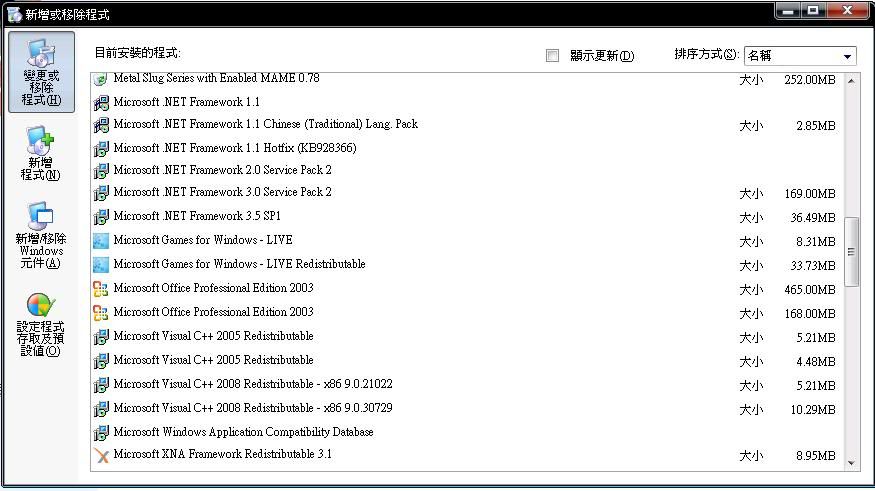
Step 2: Navigate to Control panel > Add/Remove Programs.
Step 3: Locate Microsoft Visual C++ 2005 Redistributable, more importantly, one's that say something with x64 on end. Apparently this game runs on 32-bit? Im not completely sure, but 32-bit installer comes in the downloaded package once GTAIV is installed.
Step 4: Uninstall any Visual C++ 2005 Redistributable items listed in Add/Remove programs.
Step 5: Navigate to the GTAIV main folder, and locate the installers folder. (In my case its Program files > Steam > Steamapps >Common > Grand theft auto iv > installers. People using a disk it would be to right click on your DVD/CD drive in My computer, click explore, and find the folder named "Redistributable"
Step 6: Find "vcredist_x86.exe"
Step 7: Run this installer, complete the installation.
Step 8: Check Add/Remove programs to see that the new 2005 C++ was installed.
Step 9: Attempt to load GTAIV once more, through Social club Play button. This is as far as I got before I got a new error, the above got rid of my seculaunch error though.
Step 10: If you're receiving a new error titled "GTAIV FATAL ERROR: RMN40", continue these steps, if not, play the game (Hopefully this worked for you, I could NOT find a solution until I tryed this reccomended by "theunknownsd" on gtaforums.com. He was the one who I found the above solution from, but I figured I would re-do these steps and post them as many places as I could to help other people in the same place I was.
Step 11: If you did get the "GTAIV FATAL ERROR: RMN40" after doing the above, right click on LaunchGTAIV.exe in the main GTAIV folder, and GTAIV.exe in the main GTAIV folder, and make sure that under the Compatibility tab that "run this program in compatibility mode for:" is not checked on all of the launchers. At this point, I got a NEW error once I solved that one, so if you had the RMN40 error, and unchecking compatibility mode fixed it, you may have now received the error "GTAIV FATAL ERROR: WS10", if so continue reading.
Step 12: If you got the "GTAIV FATAL ERROR: WS10", check Add/Remove programs to make sure you have "Microsoft Games for Windows Live Redistributable installed, if you do and you still get the error, uninstall the program at this time.
Step 13: Navigate to Program files > Steam > Steamapps >Common > Grand theft auto iv > installers >xliveredist.msi (Or the redistributable folder when exploring the CD for people using a CD.
Step 14: WS10 error supposibly has to do with windows live, so you want to uninstall and reinstall if you already had it, or install it from the folders in step 13 if you didnt have it at all. After uninstalling run xliveredist.msi (Or if your just now installing) and complete the setup.
Step 15: If you still get the WS10 error, download the following GTAIV Patch (Normally downloaded through social club, but at the time it wouldnt let me login to social club, this way is probably faster anyway) http://files.filefront.com/GTAIV+PC+.../fileinfo.html
Step 16: Unzip the GTAIV_PC_Patch folder, and run the Setup.exe
Step 17: Hopefully now, when you launch GTA through social club, it will load up with no errors. In my case, all of the above got me up and going, there needs to be a hardfix patch for all this BS but I took the time to write this up since I was so mad over it.
Hope this helps some people.
[ 本帖最後由 yelo99pig 於 10-7-13 03:22 PM 編輯 ] |
-
總評分:
威望 + 5
查看全部評分
|


 發表於 10-7-11 05:46 PM


 發表於 10-7-13 03:19 PM


 [/img]