2000FUN論壇


搜索
2000FUN論壇 綜合論壇 電腦軟件推薦&下載 FileMenu Tools 6.4 讓右鍵選單更豐富更方便 ~ 免安裝 ...
返回列表 發新帖 回覆
查看: 477|回覆: 0
go

FileMenu Tools 6.4 讓右鍵選單更豐富更方便 ~ 免安裝 [複製鏈接]

Rank: 7Rank: 7Rank: 7Rank: 7Rank: 7Rank: 7Rank: 7

UID
1252315 
帖子
2400 
積分
6967 
Good
8  
註冊時間
09-4-10 
在線時間
102 小時 
1#
發表於 13-1-20 09:24 AM |只看該作者 |倒序瀏覽 |打印

【軟體名稱】:FileMenu Tools 6.4 ~ 免安裝
【軟體語言】:多國語言
【軟體分類】:系統工具
【軟體格式】:自解壓縮檔
【檔案大小】:2.81 MB
【放置空間】:depositfiles / mediafire / rghost
【解壓密碼】:

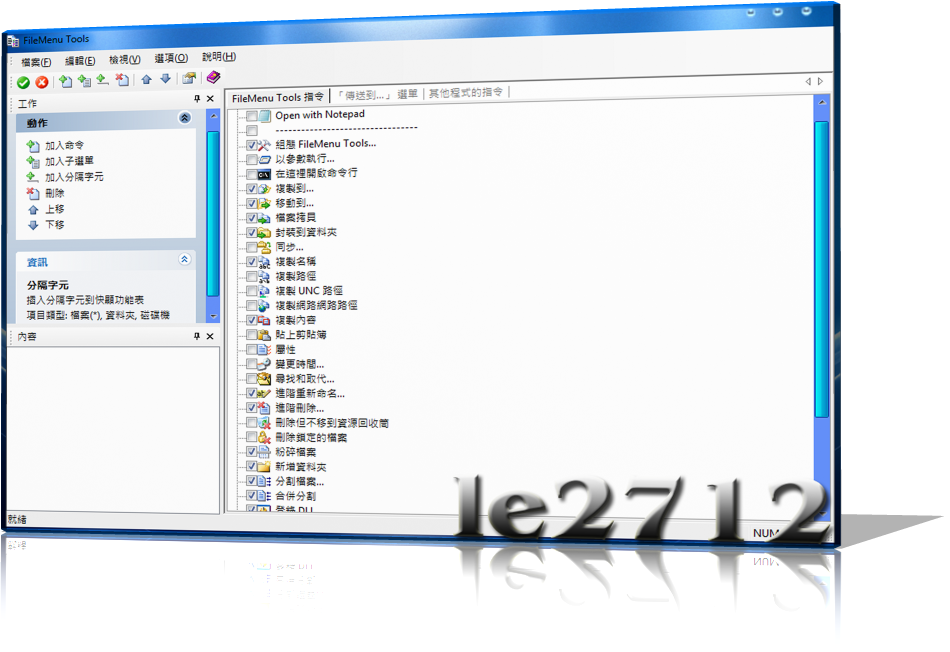
FileMenu Tools 是一款很棒的右鍵選單增強工具,它內建了許多實用小工具,例如「檔案分割合併」、「複製檔名」、「變更圖示」、「複製完整檔案路徑」、「註冊動態連結檔(*.dll)」、「進階檔名更改工具」…等。另外,它也可以修改「傳送到」裡的清單項目,以及檔案或資料夾的右鍵選單項目。FileMenu Tools 雖是英文軟體,但它支援語系檔的加裝,且操作介面是很直覺且淺顯易懂,最重要的是 FileMenu Tools 還是個免費軟體。

繁體中文介面點選上方的 Options → 選擇 Language → 點選 Chinese (Taiwan) 即可。

小提示:如果在使用過程中不想要右鍵關聯了,可以在軟體介面上選擇「選項」-「啟用 FileMenu Tools」前面的勾去掉即可!

【已包含於 FileMenu Tools 之實用工具】

    * 同步資料夾(適用於資料夾)
    * 增強型刪除工具(適用於資料夾)
    * 文字搜尋及取代功能(適用於檔案或資料夾)
    * 進階檔名更改工具(適用於檔案或資料夾)
    * 刪除被鎖定的檔案(適用於檔案)
    * 直接刪除檔案或資料夾(適用於檔案或資料夾)
    * 變更圖示(適用於資料夾)
    * 直接開啟命令列(適用於資料夾)
    * 複製檔案名稱(適用於檔案或資料夾)
    * 複製檔案路徑(適用於檔案或資料夾)
    * 複製檔案或資料夾至指定位置
    * 移動檔案或資料夾至指定位置
    * 複製 UNC 格式之路徑,例如:\\Machine\Share\Path
    * 複製 Internet 格式之路徑,例如:file://Path
    * 分割檔案(適用於檔案)
    * 合併檔案(適用於檔案)
    * 屬性修改(適用於檔案或資料夾)
    * 修改檔案「建立時間」、「修改時間」、「存取時間」(適用於檔案或資料夾)
    * 建立新資料夾(適用於資料夾)
    * 註冊動態連結 檔(適用於檔案)
    * 反註冊動能連結檔(適用於檔案)


Changes in 6.4 - 01/10/2013

- Improved Advanced Renamer: now you can add up to 5 settings for the same renaming action.
- Added a new type of custom command to rename the selected elements. In the properties of the custom command you can specify the renaming profile to be used when renaming the selected elements. Also you can specify if to enter into the subfolders recursively, or the file types to be included in the renaming.
- Fixed bug in Change Time: sometimes the time was not calculated correctly with the summer time.
- Fixed bug in Copy Internet Path: changed file:// by file:///
- Fixed bug in Select: did not work correctly on Windows XP.

Homepage - www.lopesoft.com/


‹ 上一主題|下一主題
你需要登錄後才可以回帖 登錄 | 免費註冊

聯絡我們|Archiver| 2000FUN論壇

SERVER: 2 GMT+8, 26-4-17 07:14 PM , Processed in 0.032470 second(s), 10 queries , Gzip On.

Sponsor:工作間 , 網頁寄存

Powered by Discuz! X1.5.1

© 2001-2010 Comsenz Inc.